
Non-Sequitur: Gladiator Geartrack Utility Brackets

This article is out of order with the planned series on my garage remodel and subsequent installation of pneumatic systems and CNC mill. I promise I’ll get back on that, but this was posted at the Saunders Machine Works forum and I might as well post it here as well so you can see more of the photos & video I took along the way.

Problem: I put Gladiator Geartrack slat wall panels around my garage to help get things up off the floor without making holes in the walls. The wall panels, hooks and shelf modules are a bit pricey but occasionally they go on sale, and they make it easy to organize things, and more importantly, re-organize things when you need to rejigger things to make it all fit.

But some things just don’t work. Bar clamps are an example. If I purchased hooks for each clamp I own, I’d be out $150-200 at the very least, and it would use the space inefficiently. Now I could go and lag some inexpensive pieces of pine or maple into the studs in the walls and make a clamp rack in the corner of the garage where I plan to put them. And I probably won’t move them once I’ve done it. But the slat wall makes moving stuff around easy, so as the garage gets revised (which has been continuous), rearranging things to fit the space available will be necessary.

So I needed some sort of bracket that would allow me to screw things into it, then hang it on the slat wall.

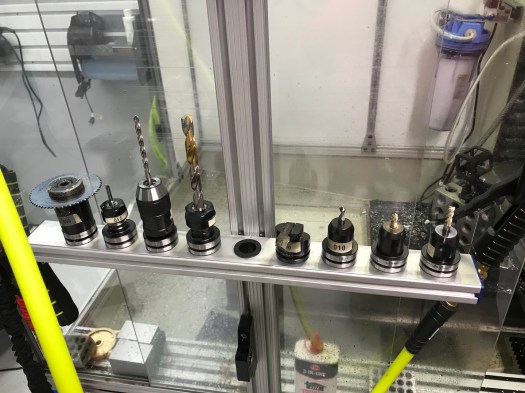
I use a lot of 80/20 extrusions around my shop. My Tormach enclosure is made from the 10 series stuff. My TTS tool racks (below) are made from 1020 extrusions and some cheap desk grommets from Amazon. So I use 1/4-20 screws all over the place since they are compatible with this type of extrusion.  And as I add to the slat wall I’ll be using it for hanging air regulators and oilers and the like as well as I expand that system. So some sort of matrix of 1/4-20 screw holes similar to a fixture plate made sense.
IMG_2027
A motley collection of tool holders if I ever saw one. Yes, that’s a TTS collet holder below.

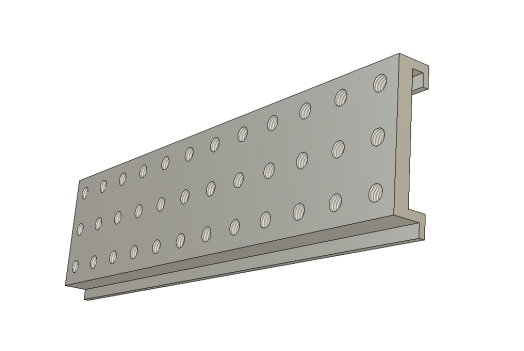
The first picture (below) is the F360 model of the matrix bracket – 12×3 7/16-14 screw holes on 1.125 spacing on center. Why 1.25″? Because my miter saw has a 1/8″ kerf and I planned to cut this up into 1″ wide pieces. (I’m reconsidering this spacing to make it more 80/20 10-series friendly, but that means saw cuts result in a <1″ part, so it’s up in the air at the moment) The 7/16-14 holes support use of a 1/4-20 threaded insert, so making the threads stronger and more durable becomes straightforward, but I can still use a 7/16 screw if that makes sense.
Gladiator Gear Track accessory rail v17
Picture 1: Fusion 360 CAD model

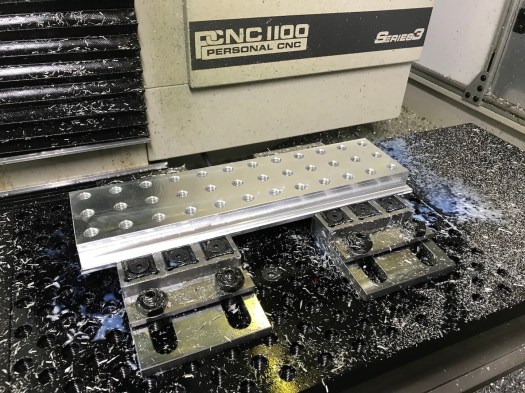
The next problem was work holding. I have a pair of GMT 6″ vises, but the blank is a bit over 14×3″ and the part is perched on top. Moreover, since I’m near the work envelope limits of my PCNC 1100, and I had a drilling operation with a large Jacobs chuck, supporting the blank in a conventional vise didn’t seem like that good an idea.

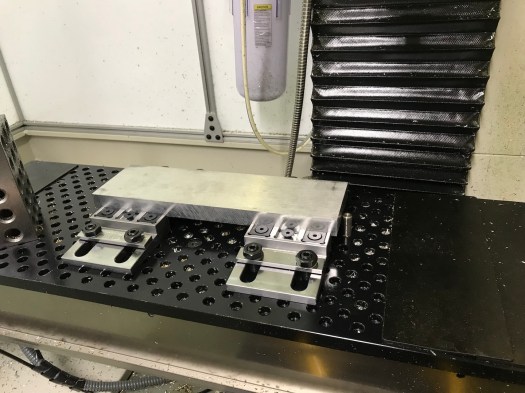
In February of 2018, I attended Saunders Machine Works’ Workholding and Fixturing class. John had already introduced his line of Mod Vises, which were interesting because a pair of mod vises would allow me to get the workpiece down near the fixture plate, leaving more room for the Jacobs chuck, and making everything a lot easier to see. Well almost (tale of woe to follow). You can see what I did in Picture 2.
IMG_2262
Picture 2: Blank in SMW Mod Vises w/ alignment pin

Let me preface the next part of this story by pointing out that (a) I’m an electrical engineer and (b) I generally assume I’m an idiot on anything outside my specialty, so I have to learn, usually the hard way. I have a nice collection of Haimer tips and busted end mills (and one thread mill) as a evidence of this school-of-hard-knocks approach.

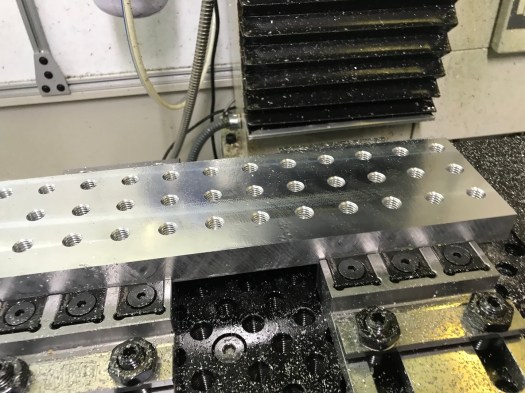
Making the field of screw holes was almost old hat (picture 3). I’ve used thread mills before and the only real problem was figuring out why my 7/16-14 screw threads did not accommodate 1/4-20 threaded inserts. To make a 7/16-14 thread, you first start with a U size drill, then thread it with an offset of 0.0802 and a 0.300″ diameter thread mill. And those of you who have worked with threaded inserts will immediately realize my error. If I read the spec for the insert, it requires an X diameter drill (0.397) because the insert does not have full-depth threads on it. Every hole, therefore, was wrong. I was able to fix this with my trusty 0.5 x 1/4″ LC VF stub end mill and milling out each hole to a minimum diameter of 0.397. Voilà! The inserts fit perfectly.  If only that was the end of the tale…
IMG_2356
Picture 3: Threadmilling is easy… If you know what you’re trying to do, that is.

So you practiced machinists will see almost immediately that when I set the CAM to hog out the flange on the bottom edge of my part on one side, held in place with Carr-Lane Tiny Vises and on the back side by steel clamping bars that came with the fixed jaw of the SMW Mod Vises. Add in a 1/2″ LC Variable Flute End Milland a dash of stupidity in the form of a common bottom level for a 2D contour operation on front and back and you get the result in picture 4 and picture 5, along with a lot of consternation over picture 6. (Yes, that’s a 1/2″ Lakeshore Carbide variable-flute endmill, which had a tragic, short life of about ten seconds)

I have a long policy now of always buying two of everything, so I kept going (never mind that I had already damaged my spare 1/2″ end mill by pressing it into the work while verifying the tool offset and breaking the corners). I replaced the solid fixture bars with a set of Mitee-Bite Talon Grips (Source: Zoro Tools though I see SMW is selling them as well), tightened everything back down again, and re-ran the op. As a result and despite those many setbacks, the first op came out somewhat acceptably as can be seen in picture 7.

IMG_2367
Picture 7: First Op complete in spite of adversity

The second op I saved for the next day. I’ve used a shear hog before, but I couldn’t recall for the life of me what the correct woc/doc was for an 1100 in 6061. So it took a few tries to get a workable combination. There’s a pretty good divot missing from the back side (where no one will ever see it!) now, but the end result was satisfactory and since I’m the customer, only I will know about it (and anybody else who reads this for its comic value). You can see some of this the video below:

Yes, I know I need to increase the non-cutting feed rate. This was just the first try and right off hand, not breaking things was more important than time.

Surface finish wasn’t bad – I have some tweaking to do because something is off somewhere and my horizontal clean-up op did pretty much nothing (seems like the tool offset on the shear hog is a bit too deep) – so I pressed on.

The last tense operation was doing something new for me – using a 7/32″ thick key slot cutterto make the slot in the upper flange of the bracket. I probably ran too many passes and could have made them much deeper, but at this point, taking light cuts (with a HSS cutter) seemed a good starting point. Mostly I was concerned that the woc was going to result in rubbing on the cutter shank on the final pass at full depth. But as you can see in the video below, this was unfounded and it worked just fine.

After a quick deburring with my chamfering tool and a few passes on the scotch-brite wheel, you see the final result in picture 10. Picture 11 (photo below) and picture 12 show the slices of this panel having been cut off using my miter saw, which worked out better than I had expected. I cleaned them up on the scotch brite wheel and threaded inserts added as a final step.


Picture 13 shows the maple clamp rail installed (and a bar clamp for reference). Picture 14 and picture 15 (Photo below) show the completed clamp rails installed on the wall and clamps (finally) stored there.

My garage is an example of trying to fit too much stuff into too small a space and trying to still be able to find things quickly and easily. The next project is a wall mounted small parts organizer based on Sortimo T-boxxes (inspired by Adam Savage’s (Mythbusters) shop setup) so I can buy nuts, screws, etc in moderate quantities (to spread out the shipping cost) and not lose them  in a junk box somewhere.

Hope someone finds this useful.
Lights & Colors

Let me preface this by saying that a year down the road, my shop still doesn’t have enough light. I have good light in a few places, including the Tormach enclosure because it has its own lighting, but area lighting leaves something to be desired, though it’s adequate.

But with all that, light was my #1 priority in my shop – not so much light sources as reflecting light so I could achieve more surface brightness without having to spend a lot on new light fixtures.

When I started, I had a typical garage floor of bare concrete. Concrete seems unique in its ability to absorb light since it is both matte and somewhat dark simultaneously. It takes a lot of light to make a concrete floor appear well illuminated.

About fifteen years ago, I had a revelation. I visited the factory floor in two of my employer’s facilities a few months apart. One had a sealed concrete floor with mercury vapor lighting in a gray steel framework above, the other had white epoxy-painted concrete with a white-painted ceiling structure and fluorescent lighting. The contrast couldn’t be more stark. You could see quite well in the first, but it felt dim – all the surfaces seemed drab and dingy looking, even when they were new (this facility has been around since the late 60s). The “newer” facility (the building dated back to the 1970s if not earlier, but had received a major facelift) seemed bright and more importantly everything you wanted to see was well lit without adding task lighting (at least externally). It felt like an office environment, yet it was a production floor building some fairly large items.

So it was this experience that colored my thinking when it came to the floor surface treatment and painting the walls as I cleaned out my garage in preparation for moving in  new equipment.

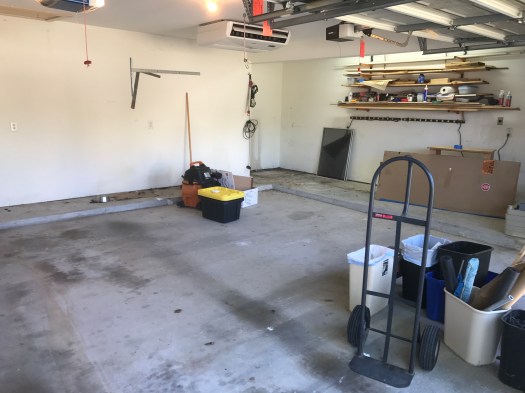
Here’s a picture of where I started, after significant removal of material. Nothing you see here remains as it was except for things attached to the ceiling.

IMG_0025
Before

The experience at my employer’s production facility made it very clear to me that everything in this garage was going to be about one thing Light. I can attest after living here for 15 years before starting this project that the garage wasn’t a good workspace. Even with the lighting I had added, it was still dim in the workshop extension.

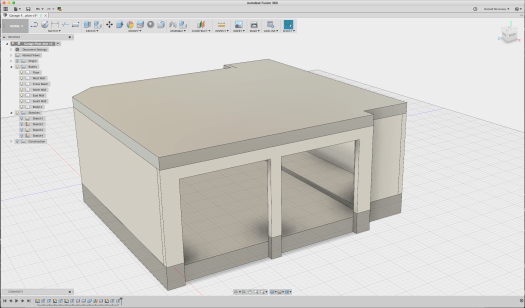
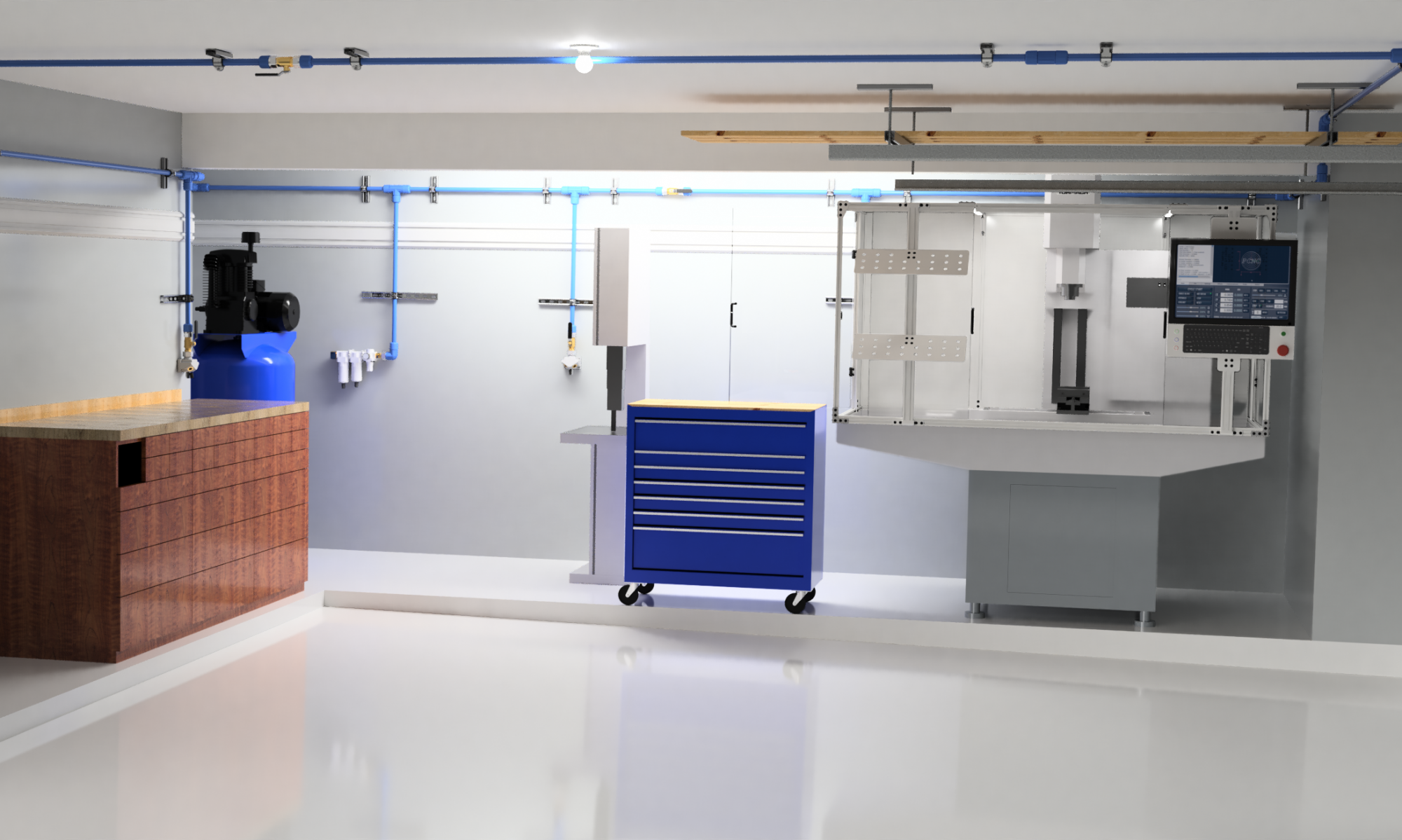
But I wasn’t happy with just taking a guess. I wanted to see what it would look like first. Having more time than money, I modified the floor and walls in my Fusion 360 model until I was happy with it.

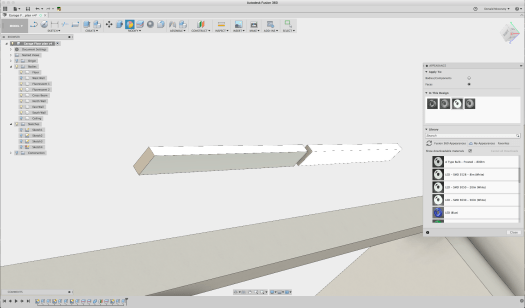
So starting with the model from my last post, what you see is that the material I default to in Fusion 360 is 6061 Aluminum. Right. It’s shiny and gray colored. If you were to go render it you’d quickly discover that it reflects lots of light.

Let’s fix this by making the materials more realistic.

We’re going to use the F360 native material Limestone from the Stone folder in the Physical Material palette to represent concrete – there’s a ‘concrete’ in the appearance palette, but it’s tiled and doesn’t look right. Besides, we’re going to cover it up shortly anyway. The walls we’ll make out of paper in the “misc” folder in order to get a reasonable surface texture.

This should look approximately like my garage did when I started.

Screen Shot 2017-09-04 at 6.14.12 PM
Model with wall material as ‘paper’ and floor as limestone

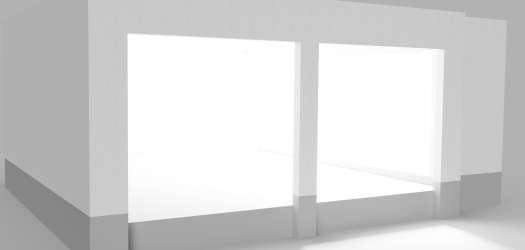
Let’s render this quickly so we can get a baseline look – with no ceiling – and get an idea what it will look like.

Garage_Floor_plan_2017-Sep-04_11-16-32PM-000_CustomizedView879436381
Baseline rendering

It doesn’t look bad, does it?

This is why you have to put in the ceiling… Things get a lot darker when you do that. So let’s use Sketch 2 from my previous post to create the ceiling since it includes the entire perimeter of the garage:

Screen Shot 2017-09-04 at 6.27.56 PM
Back in the Model environment, turn on Sketch 2

So let’s select all the profiles and create a ceiling as a new body:

Screen Shot 2017-09-04 at 6.32.03 PM
Ceiling extruded 12″ – note that it’s in aluminum by default

Since the ceiling is covered in drywall, let’s make it from paper as well (we’re not doing strength calculations here, just evaluating lighting and colors). Now re-rendering it we get a much different result:

Garage_Floor_plan_2017-Sep-04_11-34-53PM-000_CustomizedView33478931661.png
Oops. Where did all the light go?

The renderer provides a strong light source that is blocked when you add the ceiling. So now we need to add at least some light to get a representative idea of what it will look like.

Let’s add some light sources. To date, I have a single LED light bulb in the middle of the ceiling and some daylight white fluorescents in the workshop extension.

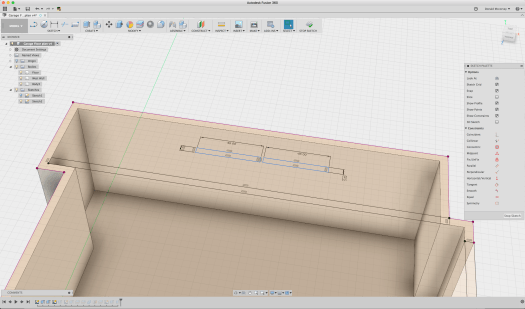
To make these lights, we turn off the ceiling and use Sketch 2 as a starting point, and create two rectangles 5×48″ long set end to end to create the fluorescents for the workshop extension:

Screen Shot 2017-09-04 at 6.52.45 PM
Creating the fluorescent fixtures

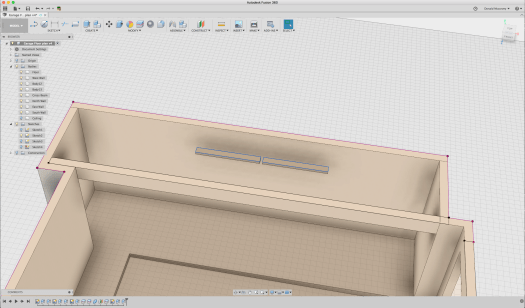
Once the rectangles are laid out, extrude them about 2″:

Screen Shot 2017-09-04 at 6.54.52 PM
Extruding the rectangles to create the fluorescents

What we’re going to do now is to create a light source by using the LED emissive appearance. And since only three faces emit any light, we’ll just apply it to those faces.

Screen Shot 2017-09-04 at 7.00.44 PM
Applying the emissive material to the surface of the ‘fluorescent’ fixture

Once applied to the bottom and longitudinal sides of the fixtures, we put back the ceiling and the wall (removed temporarily to get easy access) and re-render it:

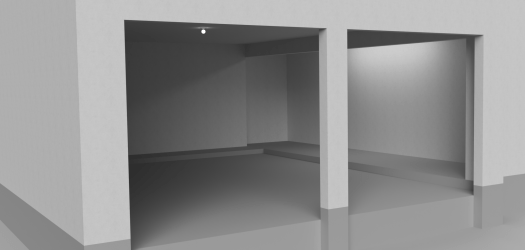
Garage_Floor_plan_2017-Sep-05_12-02-24AM-000_CustomizedView15256491721
This isn’t heaven, is it?

Obviously, I used the very brightest LED output to start with, so let’s make it closer to reality. A single fluorescent tube puts out between 50-67 lumens/watt, and the fluorescent tubes in these fixtures are 32 watts each. This means that a single fixture puts out 3200 lumens. The luminance value used by F360 is (essentially) lumens, so we can enter that directly.

Open the Appearance palette and double click the LED element used by the fluorescent fixture (it’s the bright white ring in the “in this design” box):

Screen Shot 2017-09-04 at 7.54.24 PM
Editing the luminance of the emissive appearance

Now where you see the “luminance” edit box and change it from 48,000 cd to 3200 cd/m^2 and click “done”. Now re-render it:

Garage_Floor_plan_2017-Sep-05_01-01-34AM-000_CustomizedView7319731853.png
That’s more like it… Except now it’s dark!

So now we’re pretty accurately modeling the lighting in the workshop space. Let’s add another light fixture in the middle in the fixture that the builder installed – this time a daylight-white LED bulb. We’ll just model this as a 2.5″ diameter sphere of 1500 lumens:

Garage_Floor_plan_2017-Sep-05_01-21-13AM-000_CustomizedView38552547804
That little 100W equivalent light doesn’t do much, does it?

You’re right. It’s pretty dark. So I could add a LOT more lighting, but that’s a lot of work, and the concrete floor doesn’t help at all.

What are the options for a garage floor?

  • A vinyl floor would be hard wearing and resistant to liquids – don’t forget that a car will be put on this floor every day – so some sort of roll out tile floor isn’t out of the question. Here’s an example, Congoleum sheet vinyl flooring which costs $2.97/sq ft from Lowes:
congoleum sheet vinyl
Vinyl sheet
  • A ceramic tile floor would work too. But grout, oil, and radiator coolant are probably a bad combination. Cost for material is anywhere from $4/sq ft and up, and installation is labor intensive.
  • Plastic or rubber floor tile is an attractive option – it can be had in sheets or as individual lock-together tiles. Here’s an example, a white coin-pattern plastic tile for $3.79/sq ft, no adhesive required:
rubber tile
Rubber Tile

The good part with this stuff is that you can install it yourself and it’s easy to repair.

But think about it. You’re going to be moving some heavy stuff over this material – it needs to be very smooth and hard to be at all durable. Sure, it’s meant to be parked on, but how about running a pallet jack or an engine hoist over it? And I can tell you from experience that you’re going to get scratches and marks on it. A rubber tile can be replaced easily enough but it may make things more difficult when you are putting those heavy loads on it. (I thought for many years the right way to go was this sort of floor tile – it took quite a while for me to accept that this wasn’t the right option – and a 1200lb CNC mill…)

  • Epoxy coatings are an economical solution. It takes about 2 gallons to completely cover a 2-bay garage floor. And at about six cents per square foot for the material, it looks like a very inexpensive solution.

Epoxy Coating

This is the approach I went with, but not the stuff you buy at Home Depot or Lowes. There’s more to it than just cleaning and degreasing the floor to get the stuff to stick. I started researching ways to treat the floor and concluded that there are two accepted ways to go about it: 1) apply an acid etch to rough up the surface so the epoxy will stick to it better; 2) use a mechanical method to rough up the surface. The acid struck me as a bit of a dicey proposition because it will eat away at the calcium in the concrete if it’s not thoroughly washed away, so the mechanical solution struck me as a better way to go, if one I wasn’t going to want to do myself.

So what color to use? The normal color people put in a garage is some form of gray with the notion that it hides dirt. It’s also typical to distribute multi-colored flecks over the surface before adding the top coat.

But that flies in the face of two things: increasing surface brightness with the available light and finding stuff you’ve dropped on the floor. (If there’s one thing I’m really good at it’s dropping small things and spending lots of time looking for them) Speckles and dropped fasteners or small parts tend to look very similar. Things are a lot easier to see if you’ve dropped them on a solid color, and in particular white. White shows more dirt, no two ways about it, but it also means you know when you need to get down there and clean it! (and it’s easy to do with a dust mop)

So how will this look? Let’s go back to the model. In the “appearance” palette, find the white gloss paint color, then apply it to the floor faces only.

Garage_Floor_plan_2017-Sep-05_02-40-27AM-000_CustomizedView573014191
Now it’s getting brighter

The available light now reflects off the floor and makes the whole space brighter. The real surface is not as smooth and will not be quite as reflective, but this is a good enough representation.

I hired a local epoxy floor contractor, Houston Epoxy Floors, to do the work. The price was about $2.50/sq foot and well worth it because they did a good job and stood behind their work.  They used a diamond hone to rough up the surface and then filled any surface cracks before applying a two-part epoxy paint and then finally applying a clear polyurethane wear coat on top.

IMG_0041
Putting down the base coat.
IMG_0070
Floor is basically done – but now the walls look bad

It takes two color coats to do a plain white floor. With gray and flakes you can do it in one. Plan to pay extra to get that service, since there aren’t flakes in the coat to hide the thin spots in the white paint. If you have exactly the wrong concrete it might take three. Work with the contractor to figure it out.

It wasn’t quite as obvious before that the walls were scarred and tired looking so the next task was to fix the wall color.

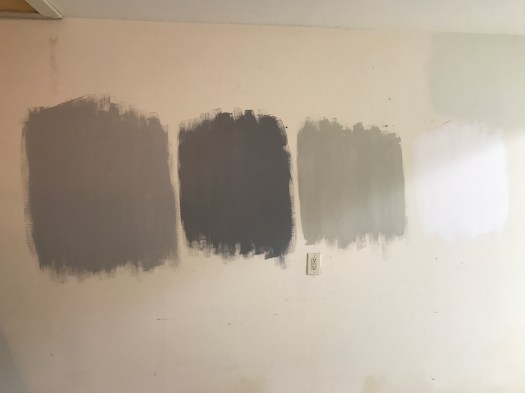
A trip to the Sherwin Williams web site followed by an in-person visit to one of their stores provided the information I needed – and three samples of paint. Since the floor is white, it seemed excessive to make the walls white as well – and they really would show every bit of dirt and wear.

I tried several samples of gray and a white color


The final solution was Monorail Silver. Serious Gray was too dark, and Useful Gray was too brown. High reflective white was there just for contrast.

IMG_0086
Shades of gray (and white)

To put this in the render, I opened a screen capture of the color from S-W’s web site in Autodesk Graphic an used the eyedropper function in the color picker to sample the color:

Screen Shot 2017-09-04 at 10.20.39 PM

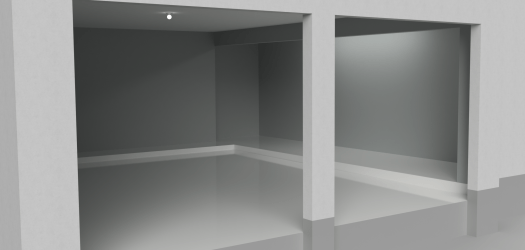
Using the above process to grab the RGB values, I tried all the colors I had sampled on the model first. Using the rough powder coat appearance as a base color, I changed the color from ‘gray’ to the RGB values of the color I wanted to try. The render of the Monorail Silver (RGB 184,188,187) came out pretty well – and is similar to the final result:

Garage_Floor_plan_2017-Sep-05_03-20-26AM-000_CustomizedView5302217604.png

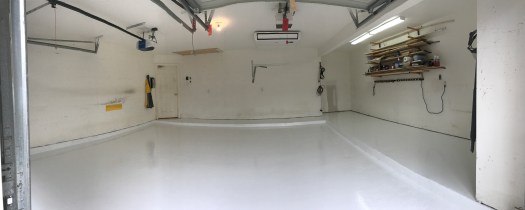
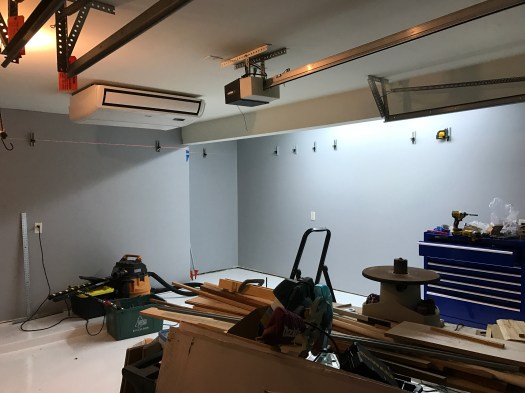
Because this is a garage, I bought Sherwin Williams best exterior latex semi-gloss paint and after patching many holes and scrapes in the drywall painted the walls. The end result took a few days, but came out fairly well:

And you can see that the light reflects off the walls a little better than it does in the rendering – probably the semigloss paint (matte paint isn’t available in exterior colors). The picture below was taken in the process of installing the air distribution system – which we’ll get to in future posts. But you can see that the work spaces are well lit and the walls don’t stand out. It still needs more light, and of the right color, which will take some time because it requires me to get up in my 120ºF/95%RH attic to add more work boxes for additional light fixtures. Maybe in January…

IMG_0158

There’s more to come, but next time we’ll talk about where to start putting things and how they actually ended up. Storage is the #1 problem in any garage, and there’s much not worked out yet. Note the wood and other stuff in the foreground above – that all had to find a home, and eventually did. It only moved about six feet… (Explaining that trick will probably require its own post, but it cost maybe $25 in materials and took an hour or so to do)

Have a great day, and thanks for reading!

UPDATE: Two days ago I added three 4ft 5000K 2-tube LED lights. There are dimmer operating rooms. Cost was fairly reasonable too in a 4-pack. I may add one more once I figure out how to mount it and hide the power cable.

Where to begin?

When this project started, my garage was crowded and hot, used mostly for storage, with a workbench and some makeshift shelves made from a lumber rack and a number of sturdy boards.

I’d show pictures, but I don’t find any in my collection that truly capture the total disaster area it was. And right off hand, when it’s 95°F and 100% humidity in late July, you really don’t care. It’s just a place where you drop things and get inside out of the summer heat.

But in the fall of 2015, I had an idea. The light fixture over the bar in my kitchen was put there by the contractor and was basically junk I had been looking for something better since I bought the house. Then Amazon had light fixture on sale for a ridiculously low price that had the shape I wanted, never mind that it was wired for a fluorescent bulb (which is why they were clearing them out). Three of them together and rewired for LED bulbs would put out a lot of light and really solve the lighting problems in my kitchen.

It took a while to figure out how to make it work, but eventually I concluded I needed three cover plates made of copper with a brown patina with some precisely drilled holes and one large 1″ hole that would need to be drilled to better tolerances than my drill press would ever be able to achieve.

I’ll put up a post on the light fixture eventually, but it was three simple 4x6x1/8″ copper plates that spawned what may someday turn into a little business.

How do I do this?

So how to make those copper plates? Well the first place to go is the Internet and start learning about CNC machines.

There are all sorts of small CNC machines out there that would have done the job. Nothing against them. They fit a particular niche and so long as you aren’t working with metals, there’s not much you can’t do with them.

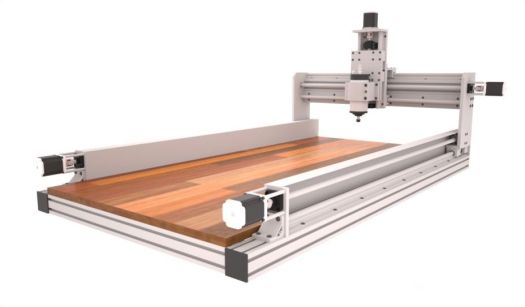
CNC-Router-Plans-3-Axis-with-2x4

CNC Router

But my projects are mostly going to be in metal. Yes, you can do aluminum on a CNC router, and I can easily see using one for big, flat jobs (which I have some of in my list of ideas). But they lack rigidity needed to plow through metals without burning up or breaking expensive cutting tools.

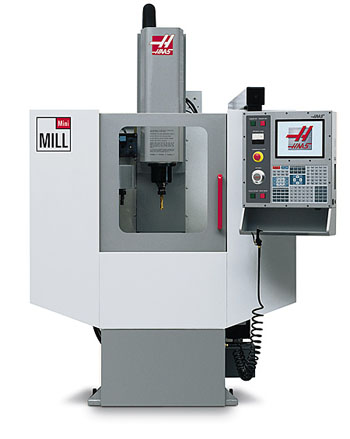
I started looking at CNC mills. Phew! Those things get expensive. The *smallest* mill from Haas would just barely fit in my garage and started at $32K. A Brother Speedio might fit, but it was more like $90K. Used examples could be had for closer to $20K, but then you’re dealing with a machine that’s over ten years old and who knows how much work it needs to make it work accurately.

Haas_Mini_mill

 Photo: Haas

Haas Mini Mill

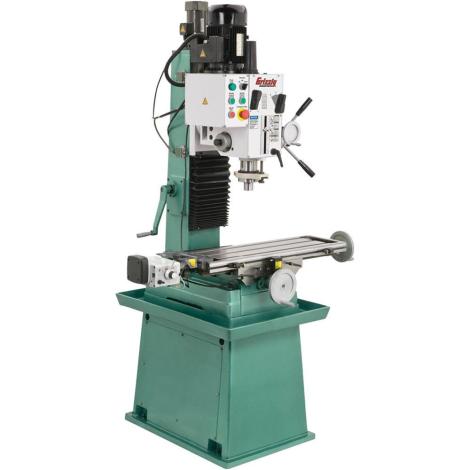
There are a number of “R45” Chinese Bench Mill conversions out there. These are small, relatively low horsepower machines with good, but limited rigidity.  And they’re relatively cheap. you can start with a machine imported by Grizzly and convert it to run CNC using Mach 3 software running on a PC.

g0755_det1-733ffd11d0f507c1692ae36a4ad8a865

Photo: Grizzly Industrial

Grizzly G7055 Mill/Drill

And if you want to build a CNC machine as a hobby, that’s a great way to go. It may never make a product for you, however, so it’s worth thinking hard before you take this route. Not to dissuade anyone who wants to try it.

You won’t get much more than 1-2hp in a Chinese bench mill. You can put a bigger motor in it, but the accuracy will be limited. Cast iron seems heavy and strong, but when you’re trying to machine something to 0.0001″, these machines won’t get there with much more than 1.5HP.

If you want more horsepower, you need more cast iron. And that means the bigger, more expensive machines. (that was why the Haas Minimill was attractive – more cast iron, 15HP motor, but the cost was well beyond my means)

There’s another problem, of course. Electrical power in a residential home is pretty much single phase AC, 240V phase-to-phase (120V phase to neutral). Up to three horsepower you can get single phase motors pretty easily. And you can only pull down so much current from your service panel. Most residential homes are going to be 75-100A service, so when the air conditioning is running, and your shop compressor is on, and the mill spindle is going, you do not want the lights to go out as the main breaker on your house trips.

Intermittent loads are generally OK, so do a little math and figure out how much current you’re going to be pulling at any given moment. If it looks like you’re going over the available service, particularly as motors start up, you may need to upgrade your service (or buy another house or shop that has a bigger panel and possibly three phase power).

So when it comes right down to it, what you need is a machine that will work not just for the parts you want to make, but within the limitations of space, power, and cost. And that depends entirely upon what you want to do, where you’re putting your shop, and how much you have to invest in equipment.

There are a couple manufacturers who have decided to fill this niche. Tormach is one of them. They carry a line of three bench mills – the PCNC 1100 (1.5HP), PCNC 770 (1HP) and PCNC 440 (3/4HP). The 440 is the most basic, but can be had with a Power Drawbar (more on this later) and soon an  Automatic Tool Changer (ATC). The 770 has a larger work envelope and more powerful spindle, but its primary benefit comes to users who want to move the machine to a basement shop since it can be relatively easily disassembled and carried down a set of stairs. The PCNC 1100 is their flagship machine and offers their largest work envelope and most powerful motor.

32085_Tormach_PCNC_1100_Series332084-770-3-4_700x700440_PCNC_PreordersPhotos: Tormach

Tormach PCNC Mills

The fact is, the only difference between these machines in terms of their end product is how large their work envelope is and how fast they remove material.

If you can fit your project on the table in a 440, the 440 will do the job. My very first experience with a Tormach was on a 440 and while the machine is small it works remarkably well. It even has some advantages on the 1100 because of its 10K RPM max spindle speed for things like engraving. (The 770 also has a 10K spindle) The 1100 is limited to 5100 RPM (there is an optional high speed spindle).

The real advantage of the Tormach product line is their control software, PathPilot. Mach 3 works, but it hasn’t been improved upon in a while and is hosted in MS Windows. PathPilot is built on top of LinuxCNC which runs on a real time Linux kernel and so does not run into problems with operating system calls interfering with driving the stepper motors on the table and the Z-axis.

Path-Pilot-Contoller-and-MonitorPhoto: Tormach

Pathpilot Controller

Pathpilot is easy to use and can be navigated with a touch screen monitor. It is network aware so with an inexpensive USB wifi dongle you can  put the mill on your home network and move data to it as if it were any other networked drive – something that will be of more importance when you want to transfer your CAM programs to it.

The user interface is about as intuitive as you can ask for and works well with a touchscreen display, potentially eliminating the need for a mouse.

This isn’t an ad for Tormach, though it probably looks like one. It’s not without reason. Tormach is growing rapidly because they make a good product and sell it at an attractive price. Is it the best machine on the market? That’s up to the person buying the machine. For my particular application it should work well for quite a while.

One thing to keep in mind. Who you are is probably as important as what you want to do. I am an electrical engineer, not a machinist. This means practically that I am learning everything from the ground up. Bits and electrons I know. End mills and fly cutters are a new concept. My purpose is to teach myself a new skill while pursuing some personal projects and maybe build a business around it.

Make sure you are working around what you like doing, because if you don’t, you’re buying an awfully expensive paperweight.

Selecting a Mill

For the moment, let’s just talk about volume and cost. You have only so much space available in your shop and you have (presumably) a limited budget.

Sticking with Tormach, it’s really a more a question of how much you can afford and how much space you have to work in. The bare 440 mill will set you back around $5K, and fits in about the same space as a woodworking radial arm saw. (you can get the fully tricked out mill with stand, enclosure and some basic HSS tools for about $10K)

The 770 costs about $7K for the bare machine, and with the full stand and enclosure is about 50% larger than the 440.

The 1100 bare mill is a little over $8K and has a 42×80″ footprint when you add the stand and coolant tub.

Another thing to keep in mind is that you need space to get around the mill – make it wide enough for you to slither behind it to maintain and modify the machine. This is easy with the 440 – you could mount that machine on casters if you wanted to.

I went with the 1100 because I planned from the outset to make the room for it, and wanted to be able to maximize what I could make with the machine, though I was sorely tempted by the 440’s compact size and relatively low cost.

So with that decision made, the next problem was “where does it go?” in my crowded garage.

Next time… Modeling the garage

Welcome to Standing Stones CNC

A friend of mine suggested I start publishing my experiences putting together my home CNC machining shop in a blog. I’ve been at this for a little over a year, documenting most of it with pictures, and learning quite a bit as I’ve gone along.

What has been most interesting about this process has been discovering that if you design something in high precision, using tools that remove much of the human error from it, you get out something that fits together easily and works.

More importantly, the more you put into refining your design before you cut the first piece of metal, the more likely you’re going to get what you’ve modeled when you actually build it.

In February of 2016, the garage was hot in the summer, filled with one car, a band saw, a drill press, a workbench, and lots of assorted stuff. In June of 2017, it’s air conditioned, organized, there’s a Tormach PCNC 1100 mill where there used to be piles of stuff. (The stuff is still a problem – it’s in a tent on the back patio at the moment – but everything has to eventually go somewhere permanently – if it isn’t in the model, it doesn’t go in the shop)

So at least for the moment this blog is to share the process of putting together my garage and installing the heavy equipment. The next few posts will cover

  • Modeling the garage in Fusion 360, making models of the major parts, and placing them in the model.
  • First steps in making it real – adding the air conditioner, having the floor epoxy coated, and painting the walls (badly).
  • Picking and installing an air compressor as well as a distribution system to serve the whole garage without having hoses everywhere.
  • Ordering the Tormach and getting it delivered and assembled.
  • Adding the power drawbar and fog buster
  • Making my first project – the three copper plates that kicked off this entire enterprise.
  • Getting the lumber off the floor without throwing it out
  • Organizing my toolbox
  • Designing a custom enclosure for the Tormach
  • Fixing the compressor drain so it doesn’t blast into the garage
  • Assembling the enclosure

After that, we’ll see where things go. The bandsaw is still on the back patio, needs a new 240V outlet and a new mobile base. The drill press also needs back in its new (as yet undefined) spot.

So what the heck is the name about? And what does a henge have to do with Computer Numerically Controlled machine tools?

Well for one, it’s memorable. It yields an easily recognizable logo, and touches on one my interests, astronomy – the layout of the stones indicates the the seasons and the time for planting and harvests, which tie in the the position of the sun and the stars.

But mostly it’s just for fun.

More to follow…